
#916608 color HEX code RGB, HSL, CMYKCOLOR CODE FOR HEXA COLOR #916608 |
|
#916608
|
In a RGB color space, hex #916608 is composed of 57% red, 40% green and 3% blue. RGB color code is composed of a hexadecimal 91 red (145/255), a 66 green (102/255) and a 08 blue component (8/255). The decimal RGB color code is rgb(145,102,8) In CMYK color space, it is composed of 0% cyan, 30% magenta, 94% yellow and 43% black. It has a hue angle of 41.17o degrees, a saturation of 90% and a lightness of 30%. Closest websafe color is: #996600 rgb (153, 102, 0). |
   |
|
#916608 rgb(145,102,8) | = | 57% from 255 | 40% from 255 | 3% from 255 | = | 0 from 100 | 30 from 100 | 94 from 100 | 43 from 100 |
|
|
|
|
|
|
|
|
|||
| R: 145 red | G: 102 green | B: 8 blue | C: 0 cyan | M: 30 magenta | Y: 94 yellow | K: 43 black |
|||
| Hexa color | RGB color chart | CMYK color chart | |||||||
|
| Shade color variation |
| Tones of #916608 |
| A tone is produced by adding gray to any pure hue. In this case, #8F6914 is the less saturated color, and #867757 is the most saturated one. |
|
| Color of the text | Background color example |
|
Color of the text
|
Background color example
|
|
<font color="#916608;">Text here</font> |
<div style="background-color:#916608;">Text here</div> |
| Color preview on black background | Color preview on white background |
|
color preview on black background
|
color preview on white background
|
|
HTML code <div style="background-color:#000000"> <font color="#916608;">Text here</font> </div> |
HTML code <div style="background-color:#FFFFFF; border: 1px dotted #999999;"> <font color="#916608;">Text here</font> </div> |
| Div box shadow | Text shadow css code |
|
box shadow for color #916608
|
text shadow css code
|
|
HTML code <div style="background-color:#FFFFFF; box-shadow: 2px 2px 7px 1px #916608;"></div> .box-shadow: 2px 2px 7px 1px; |
CSS code .text-shadow: 1px 2px 2px #916608; |
| Box border html code | Text shadow with RGB values for color #916608 |
|
box border html code for color #916608
|
text shadow with RGB values |
|
HTML code <div style="background-color:#FFFFFF; border:1px solid #916608;"></div> |
CSS code with RGB .text-shadow: 0px 2px 2px rgba(145, 102, 8, 1.4); |
| Pre-formatted code 916608 | code for script / programming |
| HTML, CSS: | = #916608; rgb(145, 102, 8) |
| Java: | = new Color(145, 102, 8) |
| .NET: | = Color.FromArgb (145, 102, 8); |
| Xojo: | = rgb (145, 102, 8, 0); |
| openGL: | = glColor3f (0.57f, 0.4f, 0.03f); |
| Swift: | = UIColor(red:0.57, green:0.4, blue:0.03, alpha:1.00000); |
| Objective-C: | = [UIColor colorWithRed:0.57 green:0.4 blue:0.03 alpha:1.00000]; |
Monochromatic color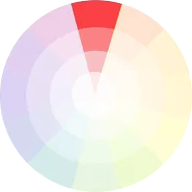 Monochromatic color schemes are easy to create because they use only one color. Monochromatic schemes use different tones from the same angle on the color wheel (the same angle).Just change color saturation +10% and you have a new monocromatic color. On our case color: 94% has a #916608 saturation. Adding 94% + 10% = 100% saturation for our new color #6B4900. Decreasing 94% - 10% = 84% saturation for other monochromatic color #B8871D. |
Analogous color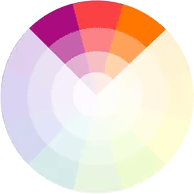 Analogous color schemes are created by using colors that are next to each other on the color wheel. Just +/- 30o on sides of the color hue angle. |
Complementary color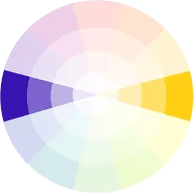
Complementary schemes are created by combining colors from opposite sides of the color wheel. Simple add 180 degrees to color hue / angle and you have the complementary color. On our case color: #916608 has a 41o angle. Adding 41o + 180o = 221oo for our new complementary color #093491.
|
Split color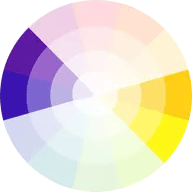 Compound schemes or split complementary schemens are almost the same as complementary schemes. Instead of using colors that are opposites, it uses colors on both sides of the opposite hue angle. On our case color: #916608 has a 41o angle. Adding 41o + 180o+30o = 251o for our first complementary color #220991. Decreasing 41o + 180o-30o = 191o for the second complementary color #097891. |
Tiradic color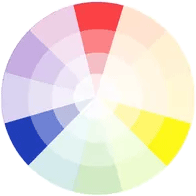 Triadic schemes are made up of hues/angles equally spaced around color wheel. Add and decrease +/- 120 degrees on both sides of the color hue angle. |
Tetradic color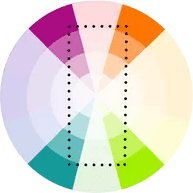 Tetradic schemes are made up of hues/angles spaced around color wheel. Add 120,180,300 degrees on the color hue angle. |

 | solid angle |
measurement units | |


